

What You’ll Build
- A Mastra agent that can participate in conversations as a documentation expert.
- Triggered only when explicitly mentioned (e.g.,
@agent). - Can fetch knowledge from your docs and return short, sourced answers.
- Integrated into CometChat chats.
Prerequisites
- A Mastra project (
npx create-mastra@latest my-mastra-app). - Node.js installed.
- OpenAI API key in
.envasOPENAI_API_KEY. - A CometChat app.
Quick links
- Repo: mastra-knowledge-agent
- Quickstart: Knowledge Agent Quickstart
- Swagger UI (local): http://localhost:4111/swagger-ui
- Environment variables: README#environment-variables
How it works
This example implements a retrieval-augmented Knowledge Agent that:- Ingests sources (URLs, files, or raw text) into a local knowledge folder per
namespaceusing the ingestSources tool. Parsed content is stored underknowledge/<namespace>for repeatable retrieval. - Retrieves relevant snippets with the docsRetriever tool. It scans your
knowledge/<namespace>content, chunks and ranks results, and returns the best matches with source metadata. - Generates answers using only retrieved context. The agent replies when invoked (e.g.,
@agent), composes a concise answer, and appends a short “Sources” list with citations. - Handles errors defensively. Server utilities sanitize errors before returning responses.
Setup
Prepare project
Create a Mastra app and add
OPENAI_API_KEY in .env. See the repository README for exact steps.Define the agent
Add a knowledge agent that answers from retrieved docs only, and responds when explicitly mentioned (e.g.,
@agent).Register in server
Register the agent and expose endpoints for
/api/tools/ingestSources, /api/tools/searchDocs, and /api/agents/knowledge/generate (see server entry).Ingest knowledge
Choose a
namespace (e.g., docs) and POST sources to /api/tools/ingestSources. Use URLs, file paths, or raw text. Request shape is documented in the README Quickstart.Ask the agent
Send chat turns to
/api/agents/knowledge/generate with a messages array. Optionally pass toolParams.namespace to scope retrieval.Connect to CometChat
In Dashboard → AI Agents, set Provider=Mastra, Agent ID=
knowledge, and point Deployment URL to your public generate endpoint.Project Structure
Core files and folders for the Knowledge Agent (browse source on GitHub):- Environment
- Runtime & config
- Agent
- Tools
- Server
- Workflows
- Knowledge base (sample)
Step 1 - Create the Agent
src/mastra/agents/knowledge-agent.ts (view in repo):
- Agent file: src/mastra/agents/knowledge-agent.ts
- Docs retriever tool: src/mastra/tools/docs-retriever.ts
- Knowledge folder: knowledge
- Set
nameto “knowledge” so the API path is/api/agents/knowledge/*. - Respond only when mentioned (e.g.,
@agent). - Answer from retrieved docs and include a short “Sources:” list.
- Register
docsRetriever.
Step 2 - Register the Agent in Mastra
src/mastra/index.ts (view in repo):
- Server entry: src/mastra/index.ts
- Ensure the agent is registered with key “knowledge” → API path
/api/agents/knowledge/*. - Storage/logger configuration as per repo README.md.
Step 3 - Run the Agent
Dev script & local server details are tracked in your repo:- Scripts: package.json
- Quickstart: Knowledge Agent Quickstart
http://localhost:4111/api
Ingest sources
POST to
/api/tools/ingestSources with a namespace. Example commands are in the README Quickstart.- POST
/api/tools/ingestSources— ingest URLs/files/text intoknowledge/<namespace> - POST
/api/tools/searchDocs— retrieve relevant snippets fromknowledge/<namespace> - POST
/api/agents/knowledge/generate— chat with the agent
Step 4 - Deploy the API
Ensure the public route:/api/agents/knowledge/generate is reachable.
Step 5 - Configure in CometChat
Open Dashboard
Open the CometChat Dashboard.
(Optional) Enhancements
Add greeting, prompts, and configure actions/tools if you use frontend tools.
For more on CometChat AI Agents, see the docs: Overview · Instructions · Custom agents
Step 6 - Customize in UI Kit Builder
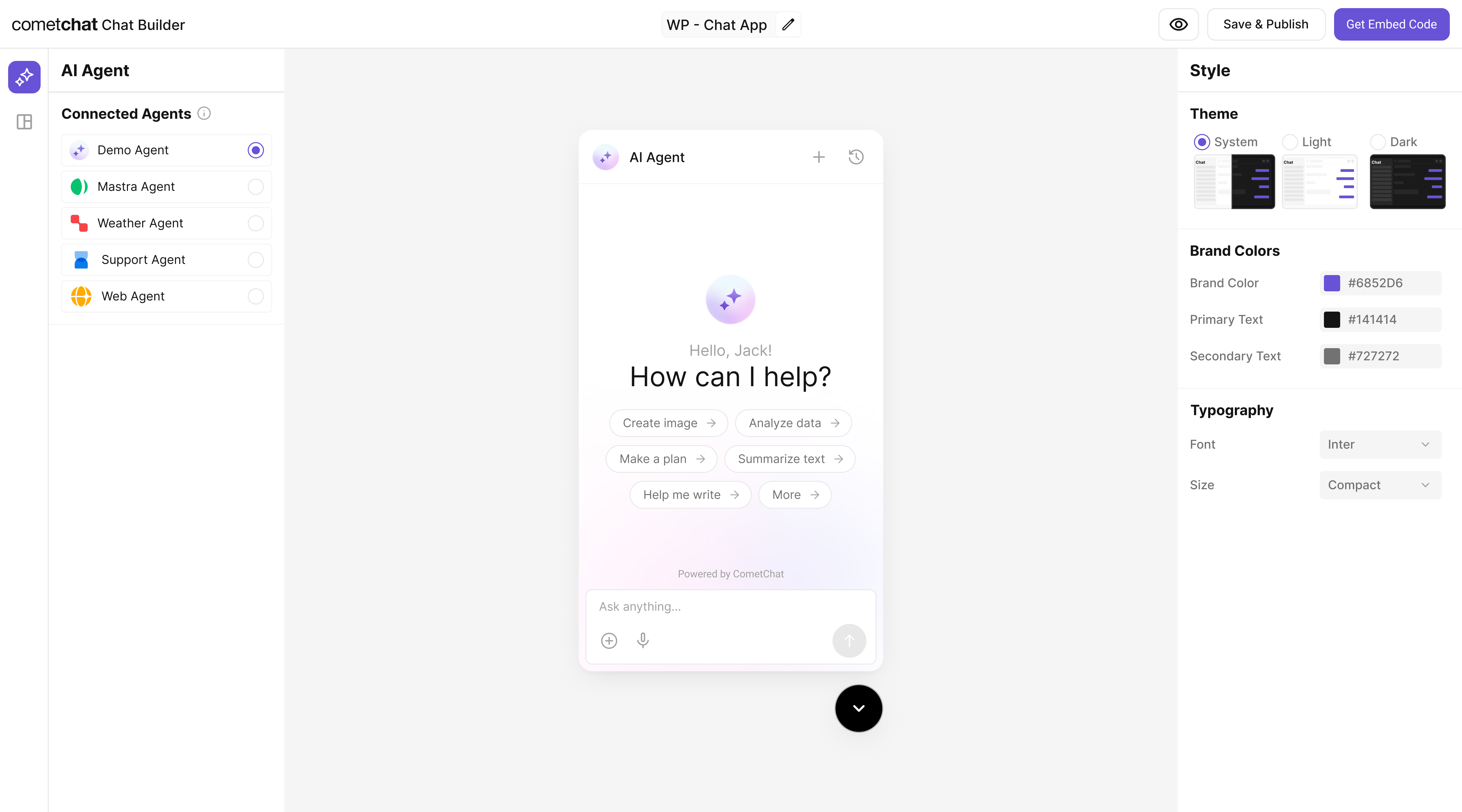
Step 7 - Integrate
Once your Knowledge Agent is configured, you can integrate it into your app using the CometChat Widget Builder:Note: The Mastra Knowledge agent you connected in earlier steps is already part of the exported configuration, so your end-users will chat with that agent immediately.
Step 8 - Test Your Setup
Security & production checklist
- Protect endpoints with auth (API key/JWT) and restrict CORS to trusted origins.
- Add basic rate limiting and request size limits to ingestion and generate routes.
- Validate inputs: enforce allowed namespaces, URL/file whitelists, and payload schemas.
- Monitor logs and errors; sanitize responses using server utilities.
- For public deploys, keep your OpenAI key in server-side env only; never expose it to the client.
Troubleshooting
- Agent talks too much: tighten instructions to only respond when mentioned and to answer from docs.
- No results: ensure
/knowledgecontains.md/.mdxfiles or your ingestion job populated the store. - Not visible in chat: verify the agent is added as a user in CometChat and enabled in the Dashboard.
- 404 / Agent not found: check that the server registers the agent with key
knowledge.
Next Steps
- Add tools like
summarize-doc,fetch-policy, orlink-to-source. - Use embeddings + chunking for better retrieval.
- Restrict answers to whitelisted folders or domains.
- Inspect and try endpoints via Swagger UI (
/swagger-ui). - Set up CI/CD in your own repo as needed.